Driver Messaging - Web Component

Raven Connected is pleased to introduce Driver Messaging, a direct communication channel between fleet managers and drivers. This feature allows you to push real-time, actionable text alerts directly to the Raven screen, ensuring critical information reaches the driver safely and instantly without them needing to check a mobile device.
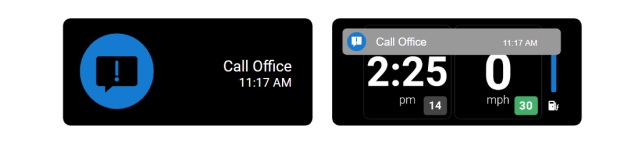
By leveraging the Raven display, fleet managers can maintain a constant link with their mobile workforce, unlocking three key operational benefits:
- Quick Notifications: Instantly alerts drivers to schedule changes, new pickups, or emergency service calls as they happen.
- Safety and Compliance: Sends proactive reminders regarding weather alerts, upcoming rest breaks, or site-specific safety protocols.
- Reduced Distraction: By displaying concise messages on the Raven, the fleet manager can minimize the need for drivers to handle phones or tablets while the vehicle is in operation.
Technical Implementation: The RC-API Messaging Endpoint
We have exposed a streamlined POST endpoint within the RC-API to allow your platform to trigger these messages programmatically.
Built-in Solution: If you are building a web-based dashboard, you can use our rc-driver-message web component. It automatically handles the API requests, parses the response codes, and provides a ready-to-use UI for sending messages.
Endpoint Overview
POST /ravens/{ravenId}/driver-message
This targeted command sends a text string to a specific Raven device. The message will appear as an overlay on the device screen, ensuring it catches the driver's eye.
Configuration Parameters
To ensure the right message stays visible for the right amount of time, the API utilizes two primary fields:
- message (String): The actual text displayed to the driver (e.g., "Call Office" or "New Stop Added"). The string has a maximum character limit of 15.
- duration (Integer): Defines how long (in seconds) the message remains visible on the Raven screen before automatically dismissing.
Best Practices: Tailoring the Communication Flow
Not every message requires the same level of urgency. Use the duration setting to match the context of the communication:
| Message Type | Recommended Duration | Why? |
| Urgent Alerts | 900+ Seconds (15m+) | For critical instructions (e.g., "STOP VEHICLE") that must remain visible until the driver acknowledges or takes action. |
| Route Updates | 300 Seconds (5m) | Long enough for a driver to find a safe spot to glance at the new instructions without the message disappearing too quickly. |
| Status Confirmations | 30-60 Seconds | Ideal for short "nags" or confirmations (e.g., "Timesheet Received") that don't require long-term attention. |
API Response Codes
| Code | Status | Description |
| 204 | Success | Message has been successfully queued and sent to the Raven. |
| 400 | Bad Request | The message is blank, exceeds character limits, or the duration is invalid. |
| 401 | Unauthorized | API key is missing or does not have permission for this Raven ID. |
| 404 | Not Found | The specified ravenId does not exist in your fleet. |
Comments
0 comments
Article is closed for comments.